
Brainstorm It! -- The Big Picture
Just Like Your Brain
Brainstorm It! (BI!) is a creativity-booster with brainstorming abilities.
It's also a data-gathering and keyword evaluation tool that reduces your workload.
And it's a mapping tool that lets you develop the logical progression of your content! Its first two parts are equivalent to the two sides of your brain...
-
Brainstormer -- the right side of BI! "gets the creative ideas."
-
Master Keyword List -- the left side gives you the functions to evaluate and manage those ideas.
Think of the third part, Blueprint It!, as the eyes that see the whole picture of what your site will become.
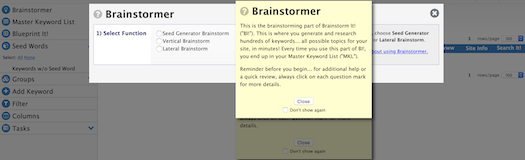
When you open Brainstorm It!, you land on the Master Keyword List (MKL) page, with a Brainstormer overlay on it. You'll also see a yellow sticky with a  link to the Brainstormer help, and a link to the Action Guide.
In the top right, you'll find your name, the words "No Domain Registered," and your order number. Once you register your domain name (DAY 5), your domain name will replace "No Domain Registered" and the order number.
Below that, you'll find links to Find It!, SBI! Support HQ and the Brainstorm It! Forum.
Over on the left is the toolbar. It starts with Brainstormer, then the Master Keyword List, then Blueprint It!.
-
Click on Brainstormer to open the research overlay.
-
Click on Master Keyword List to display the tools you'll use in the MKL, plus all of your keywords.
-
Click on Blueprint It! to open a a new browser tab or window that displays the keywords you'll drag and drop into your Content Blueprint.
Brainstormer
Click Close on the yellow sticky. Or first add a check to Don't show again if you don't want to see the yellow sticky again.
Once the sticky is closed, you have access to the Brainstormer set of keyword research tools.
Use Brainstormer to create your list of keywords related to up to three Seed Words, which are potential Site Concepts.
Any time you see a word or phrase in blue on a gray background (like the two above), click on it to open a "sticky" with a definition or more information. Do that now to see what a sticky looks like.
When you enter a Seed Word and use one of the Brainstormer queries, you get hundreds of possible topics, also known as Specific Keywords, related to that Seed Word.
Keyword: The term a person enters into a search engine when searching for something. These would be words like...
"Anguilla" and "Anguilla villas" and "Caribbean vacations."
The term "keyword" includes single words as well as multi-word phrases. Most searches are not single-word searches. Why?
Because most searchers have learned to enter two or more words in their searches to get more precise results. We call that entry a "keyword" even if it has five words in it. Another term for it is "keyword phrase."
A keyword is also the topic for the content of a web page. All the other words on that page are "content"... information about that keyword/topic.
We call the keyword that you make the topic of a web page the Specific Keyword for that page.
If you'd like more information about keywords, click here.
Seed Words are words that you use as potential Site Concepts (initially), or for broad subsections of your site (after you've chosen your Site Concept). We call the keyword that you enter into Brainstormer a "Seed Word" because it "seeds" a storm of keywords.
You will research the Seed Words in Step 3 of the Brainstormer process. In the Master Keyword List, each of the Seed Words you researched will appear in the Seed Words section.
Brainstormer queries are divided into three types...
-
The Seed Generator brainstorm generates a list of words from which you can select three to use as potential Seed Words for your keyword research. These are all words with reasonable demand and not too much competition and.
-
Vertical brainstorms generate keywords that contain the Seed Word (e.g., if you enter "anguilla," all brainstormed words will have "anguilla" in them).
There are three Vertical brainstorms...
-
The Site Concept Finder lets you research up to three potential Site Concepts at one time (it's available if you have fewer than 251 keywords in your Master Keyword List and if you have not registered a domain name yet).
It brings back hundreds of keywords for each of those three Seed Words, first pruning out, if necessary, those with the lowest Demand (more about that in the next section).
You use this brainstorm in DAY 2 to evaluate your potential Site Concepts and determine which one will become the focus of your business.
(It could be that none of the three are good enough. In that case, you'll simply repeat your research with up to three more Seed Words.)
-
The Singular AND Plural brainstorm lets you research other potential Site Concepts (DAY 2) and expand the list of keywords for your chosen Site Concept (DAY 3).
Use this query if the Seed Word you want to research has both a singular and a plural form (e.g., bird/birds) and you want both in your keyword list.
-
The Singular OR Plural brainstorm, which you use with a Seed Word that has only a singular or a plural form (e.g., mouse/mice, clothes, pants), also lets you research other potential Site Concepts (DAY 2) and expand the list of keywords for your chosen Site Concept (DAY 3).
-
-
Lateral brainstorms generate keywords that are related to the Seed Word but do not contain it (e.g., if you enter "anguilla," a lateral keyword is "caribbean island").
There are two Lateral brainstorms...
-
Used in DAY 3, the Lateral Brainstormer brings back keywords from the top 200 sites found at Google for your chosen Site Concept.
-
Also used in DAY 3, the Ultimate Outside Lateralizer is an optional brainstorm tool if you don't have a lot of keywords for your Site Concept. It visits up to 2,500 sites via Yahoo! and brings back keywords found in those sites.
-
You can use any of the brainstorms in any order you like, but we recommend you follow the proven brainstorming and evaluation steps outlined in DAYs 2 and 3 of the Action Guide.
Need a refresher? Click here to watch the videos for both of these DAYs in the Action Guide.
Click here for the Brainstormer help.
When you've completed your brainstorming process you'll have all the keywords and data you need to begin the evaluation process for each of the potential Site Concepts you selected. You do that in the Master Keyword List...
Master Keyword List
After you complete any brainstorm, the Brainstormer overlay closes and your new keywords will display in the Master Keyword List (your MKL).
Click Close on the yellow sticky. Or first add a check to Don't show again if you don't want to see the yellow sticky again.
Once the sticky is closed, you have access to the keywords in your MKL, where the newly added words appear in blue at the top of the list.
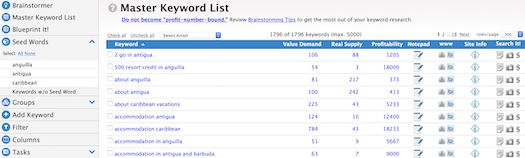
Hover over any tool in the toolbar, or a column header, or a filter, to view a tooltip with a brief description of that tool. The tooltip also has a link to the relevant help for that tool.
The MKL, which holds a maximum of 5,000 keywords, is the analytical, left brain part of Brainstorm It!. It's where you...
-
filter, sort and evaluate the keywords generated by Brainstormer
-
delete keywords, where applicable
-
export keywords to your desktop, if you want to print and study them offline
-
send keywords to Blueprint It! to arrange in a Content Blueprint
Each time you use Brainstormer, the newly added words appear in blue at the top of the MKL. Keywords already in the MKL are in black.
You can work with all three Seed Words at once, or with two of them, or with just one. Your choice.
In DAY 2, you'll filter, sort and evaluate the keywords to examine the Value Demand and the Real Supply of the keywords for each of your potential Site Concepts. At the end of DAY 2, you'll select your Site Concept, based on the evaluations you have performed.
Value Demand is a combination of how often people search for a particular keyword and how monetizable or commercial that keyword is. The best words (i.e., the highest Value Demand) have a high search volume and are highly commercial.
This measure of Demand is called "Value Demand" because it both provides a better estimate of Demand and includes a reflection of how valuable the Demand for each keyword is, in terms of its commercial potential.
Real Supply is a score for a keyword that indicates how competitive that keyword is. It provides a rough idea of how difficult it will be to rank in the Top 10 at the search engines.
The higher the number, the more competitive the situation. This measure of Supply is called "Real Supply" because it provides a true evaluation of competition for each keyword.
Click here for the Master Keyword List help.
Blueprint It!
In DAY 3, you'll continue to add (and delete) keywords to your MKL. You will also start to develop your site's Content Blueprint in Blueprint It!. By the end of DAY 3, your blueprint will be complete enough for you to...
-
start planning monetization options (DAY 4)
-
register your domain name (DAY 5), and
-
start building your site (DAY 6).
Once you have your preliminary Site Concept and a few hundred vertical and lateral keywords, you'll be ready to develop your Content Blueprint.
First, you must add the keywords to Blueprint It!, which you'll do from the MKL. Then you'll select your Site Concept Keyword (the Tier 1 keyword). Next you'll drag and drop Tier 2 keywords under the Site Concept Keyword, followed by Tier 3 keywords for each Tier 2.
Click here for the Blueprint It! help.
Time to wrap up this overview...
Right Brain, Left Brain and the Eyes
Together, Brainstormer, your Master Keyword List and Blueprint It! help you...
-
identify the best Site Concept ("niche") for you
-
brainstorm that concept to find related topics ("Specific Keywords")
-
determine the Value Demand, Real Supply, and Profitability of those topics
-
refine/optimize your final Site Concept
-
develop a preliminary, 3-tier Content Blueprint for your site
-
investigate and plan your monetization mix
The Most Important Advice for Using Brainstorm It!?
Take your time. You'll soon know your list of keywords like the back of your hand. You'll have loads of great ideas for your site, its content, and its structure.